Home › Agents for Research › Case 1
Case 1 — Reading the data, checking a draft
By Tan Haosheng, MD, PhD · Last reviewed 2026-07-31
I had two unlabelled samples in front of me and a draft of my own I wanted pressure-tested. One prompt, no scaffolding. Below is what the agent did — behaviour and timing only. The science stays out of frame.
⚠️ About this page
The underlying samples, the draft, and every conclusion drawn from them are unpublished. This page reports only: what kind of task was set, what the agent did in observable terms, and how long it took. No screenshot, number, gene, claim or figure from the underlying work is reproduced here in any form. The blurred image below is decorative — a softened snapshot of the agent's output window, with all text and values removed.
The task, paraphrased
One natural-language prompt. No JSON scaffold. No tool whitelist. No re-prompting — whatever the agent produced on the first pass is what is scored below.
What the agent did (behaviour only)
Observable sequence
- Opened and parsed both files on its own.
- Derived the distinction between the two preparations from the data itself, with a quantified breakdown as evidence — instead of asking me or guessing.
- Read the draft I attached, claim by claim, and separated the ones the data could carry from the ones it could not.
- Spotted an aggregation-vs-unit-level confound inside the draft, explained the mechanism, and corrected for technical depth before saying anything was "enriched".
- Returned sentence-level edits to the over-claimed parts of the draft.
- Did not flatten the single-patient limitation to please me.
No result, gene, percentage or hypothesis from this run is disclosed on this page.

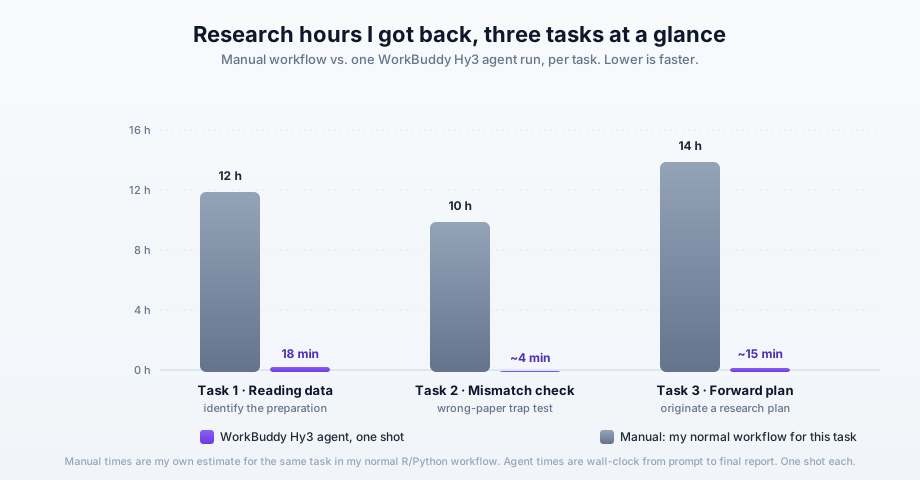
Time vs. my normal workflow
For comparison, doing the same data-comprehension + draft check in my normal R/Python workflow is a multi-session job. The agent did it in one shot.
What this case is — and isn't
- Is: a record that an AI agent was put on a real research workload and produced a useful behavioural result on the first try.
- Isn't: a scientific result, a preprint, a benchmark of agent X vs Y, or a recommendation to use any specific tool without your own quality bar.